 ofxAddons

this is a openFrameworks addon.
Forks
Forks pushed to more recently than tettou771/ofxTextFlow itself, plus any admin-confirmed fork with commits of its own — worth checking if you're hitting issues with the original.

README
ofxTextFlow
Overview
This (FORK) is an addon for openFrameworks. I made it to show debug message on window (not console) easily.
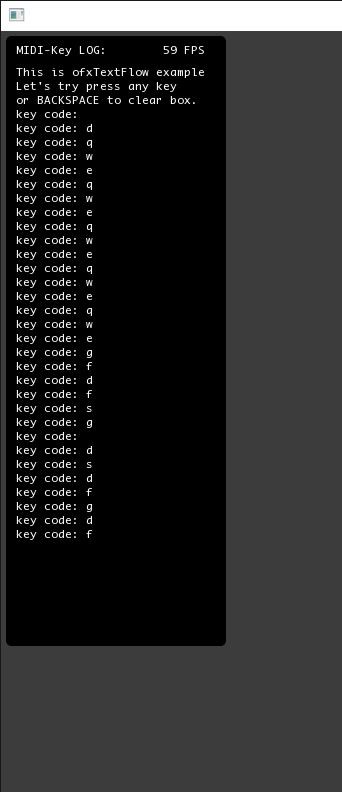
Changes by MoebiusSurfing. Original author: Toru Takata. Thanks Toru!
Requirement
ofxTextFlow doesn't depend other addons.
Tested system
- Windows 10 / VS2017 / OF 0.11.0
- macOS / High Sierra / Xcode / OF 0.11.0
Usage
1. Add this addon. 1. Include
ofxTextFlow.h. 1. Put the static method ofxTextFlow::addText("My text") when you need.It's gonna delete old message when over the max num (default: 30 lines).
You can use some method to change appearance. For example.
ofxTextFlow::setMaxLineNum(100); // set max line num 100
ofxTextFlow::setShowing(true); // show text-log box
ofxTextFlow::setTextColor(128(); // set text color
ofxTextFlow::setTitle("MIDI-Key LOG:"); // top title
ofxTextFlow::setMarginBorders(10); // padding to borders
ofxTextFlow::setShowingBBox(true); // background box
ofxTextFlow::setBBoxWidth(200); // box width
ofxTextFlow::setRounded(true, 5); // round rectangle
ofxTextFlow::setPosition(5, 5); // set box position
ofxTextFlow::setShowFPS(true); // ad fps debug to the tittle
ofxTextFlow::loadFont("mono.ttf", 8); // customize font. not required
ofxTextFlow::setLineHeight(12); // change line height