 ofxAddons


An openFrameworks addon for the Azure Kinect.
Forks
Forks pushed to more recently than prisonerjohn/ofxAzureKinect itself, plus any admin-confirmed fork with commits of its own — worth checking if you're hitting issues with the original.


README
ofxAzureKinect
ofxAddon that allows you to use Azure Kinect in openFrameworks.
Get depth, color, depth to world, and color in depth frames as
ofPixels or ofTexture. Get point cloud VBO with texture coordinates in depth space. Get body tracking skeleton and index texture. Use multiple sensors per machine (tested up to 4!) Set up sync mode (standalone, master, subordinate) with multiple devices when connected with sync cables. Record and playback streams. More coming soon...Installation
The instructions below are based on the Azure Kinect Sensor SDK Usage page.
Windows
Install the Azure Kinect Sensor SDK. Install the Azure Kinect Body Tracking SDK. Add an environment variable for
AZUREKINECT_SDK and set it to the Sensor SDK installation path (no trailing slash). The default is C:\Program Files\Azure Kinect SDK v1.4.1. Add an environment variable for AZUREKINECT_BODY_SDK and set it to the Body SDK installation path (no trailing slash). The default is C:\Program Files\Azure Kinect Body Tracking SDK.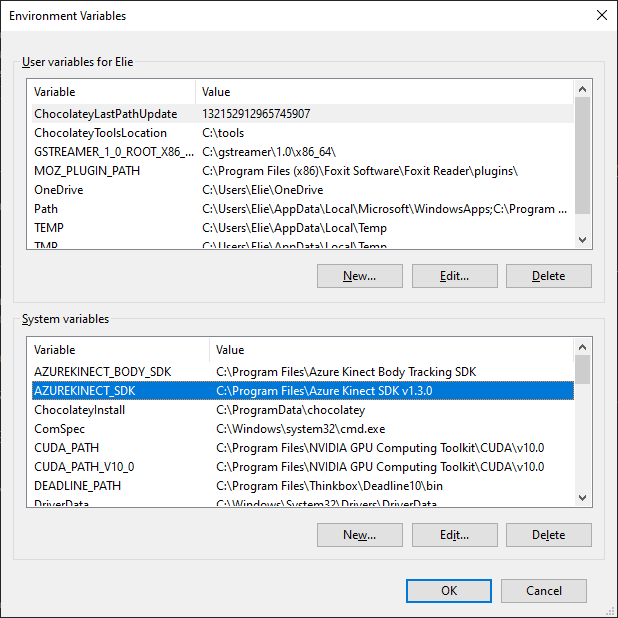
Add the path to the Sensor SDK
bin folder to the PATH variable. The default is %AZUREKINECT_SDK%\sdk\windows-desktop\amd64\release\bin. Add the path to the Body SDK bin folder to the PATH variable. The default is %AZUREKINECT_BODY_SDK%\sdk\windows-desktop\amd64\release\bin. Add the path to the Body SDK tools folder to the PATH variable. The default is %AZUREKINECT_BODY_SDK%\tools.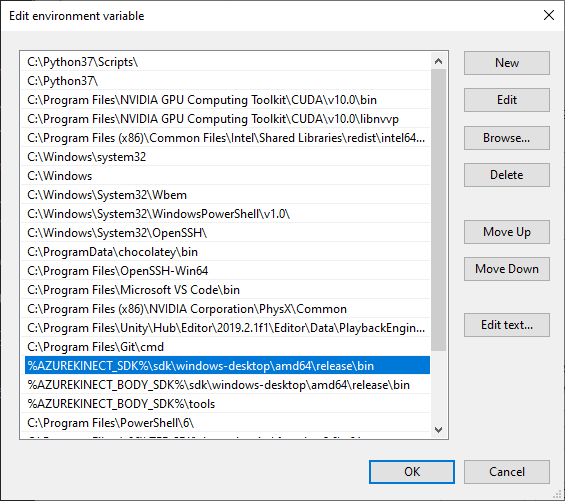
Clone this repository in your openFrameworks
addons folder. You can then use the OF Project Generator to generate projects with the appropriate headers and libraries included. ✌️ Note that if you want to use body tracking, you will need to copy the cuDNN model file dnn_model_2_0.onnx from the Body SDK tools folder into your project's bin folder!Linux
Configure the Linux Software Repository for Microsoft. Note that for Ubuntu you'll need to set up the repo for 18.04 even if you're running newer versions. Install the Azure Kinect Sensor SDK packages:
libk4a1.3 libk4a1.3-dev k4a-tools Install the Azure Kinect Body Tracking SDK packages: libk4abt1.0 libk4abt1.0-dev Setup udev rules by copying this file to /etc/udev/rules.d/99-k4a.rules. Install libjpeg-turbo. Clone this repository in your openFrameworks addons folder. You can then use the OF Project Generator to generate projects with the appropriate headers and libraries included. 🐣Compatibility
Tested with: openFrameworks 0.10.x / 0.11.x Windows 10, Visual Studio 2017 / 2019 Ubuntu 19.10, Qt Creator
Examples
Use the OF Project Generator to create the example project files. If everything is installed correctly, it should properly locate all required include and library files.
example-streams demonstrates how to get depth, color, infrared textures from the device. example-scaled-depth demonstrates how to remap the depth data to a narrower (probably more useful) range. example-pointCloud demonstrates how to draw the basic point cloud VBO from the device. example-world-coord demonstrates how to get the world coordinate from the depth and depth to world data sets. example-shader demonstrates how to reconstruct a point cloud using LUTs in a shader. example-bodies demonstrates how to get the body tracking index texture and skeleton joint information in 3D. example-bodies-projected demonstrates how to get the body tracking index texture and skeleton joint information in 2D. example-multi demonstrates how to use multiple devices in a single app. example-record demonstrates how to record and playback device streams.