 ofxAddons

ImGui Vector Editor Widget for openFrameworl
README
ofxVectorEditor
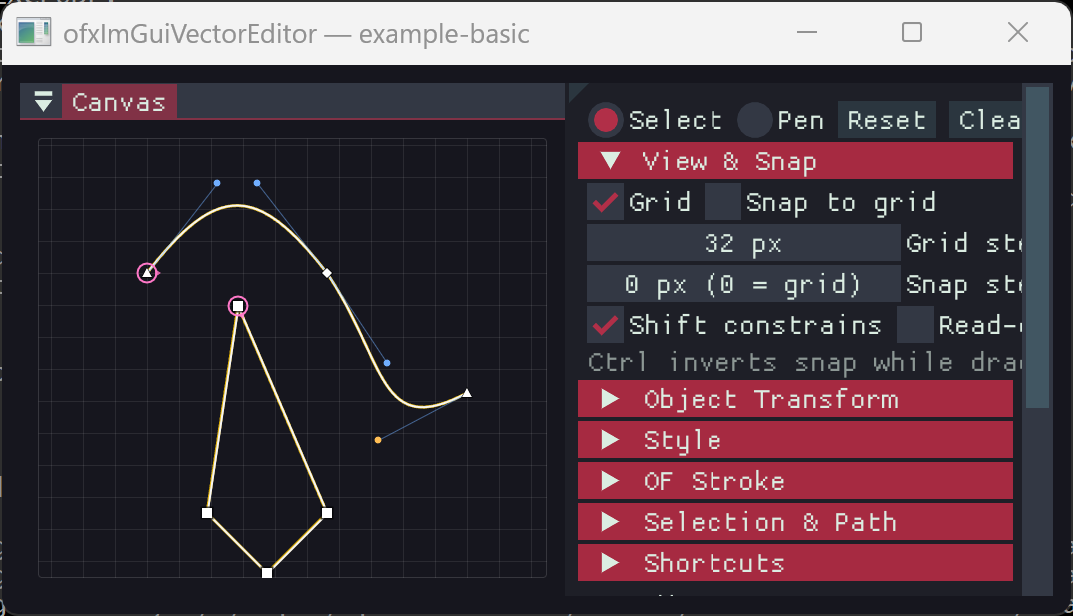
ofxVectorEditor packages a small, generic ImVectorEditor path editor widget for openFrameworks projects. The core widget follows the ImPlot / ImNodes / ImGuizmo style: reusable immediate-mode types live in the ImVectorEditor namespace.Two layers, one addon:
ImGuiVectorEditor.h/.cpp— the pure ImGui widget. No hard OF
ofPath conversion (Path::loadOfPath / Path::toOfPath, arcs imported as cubics). ofxVectorEditor.h/.cpp— the OF conveniences:PathEditor
ofPath, edit it in a self-contained pan/zoom/ruler panel), PathDocument (ofPath layers + ImGui layers panel), and header-only SVG import (ofxVectorEditorSvg.h, needs ofxSvg).Everything is instantiable — plain classes, no singletons or global state.
Basic Use
#include "ofxImGui.h"
include "ofxVectorEditor.h"

ofxImGui::Gui gui;
ImVectorEditor::Editor editor;
ImVectorEditor::Path path;
ImVectorEditor::Config config;

void ofApp::draw() {
    gui.begin();
    ImGui::Begin("Vector Editor");

    config.tool = ImVectorEditor::Tool::Pen;
    config.canvasSize = ImVec2(800, 500);
    auto result = editor.Draw("##editor", path, config);

    if (result.changed) {
        // Convert or consume path in your host application.
    }

    ImGui::End();
    gui.end();
}
ofPath-First Use
#include "ofxVectorEditor.h"

ofPath myPath;                          // your existing ofPath
ImVectorEditor::PathEditor pathEditor;

void ofApp::setup() {
    pathEditor.bind(myPath);            // edits write back automatically
}

void ofApp::draw() {
    myPath.draw();                      // native rendering, always current

    gui.begin();
    ImGui::Begin("Editor");
    pathEditor.draw("##editor");        // pan: middle-drag, zoom: wheel
    ImGui::End();
    gui.end();
}
Any
ofPath imports: lines and cubics map 1:1, quads are promoted to cubics, arcs are approximated with cubic segments. PathDocument adds ordered layers (visibility, lock, color, rename, drag-reorder) with drawImGuiPanel(), and ofxVectorEditorSvg.h loads each SVG path into a layer.Coordinate Model
Path anchors are stored in local path space.
Config::transform maps that local space into the ImGui canvas:1. Apply
objectScale. 2. Apply objectRotationRadians. 3. Apply objectTranslation. 4. Apply canvas zoom. 5. Apply canvas pan.Object transforms belong to the host application, while anchor and handle edits belong to the vector editor.
ImGuizmo Compatibility
The widget does not depend on ImGuizmo, but it is designed to compose with it. Use ImGuizmo for object transforms and feed the resulting values into
Config::transform. Use the capture flags to decide who receives pointer input:auto result = editor.Draw("##editor", path, config);
if (!editor.WantsMouseCapture()) {
// Safe for the host to route mouse input to ImGuizmo.
}