 ofxAddons


VASEr by Tsang Hao Fung (Chris Tsang) inside OF
README
ofxVaseRenderer
High-quality 2D shape renderer for openFrameworks with anti-aliased strokes, fills, variable width, per-vertex color, and smooth joints. Based on the VASE renderer algorithm by TSANG, Hao Fung.
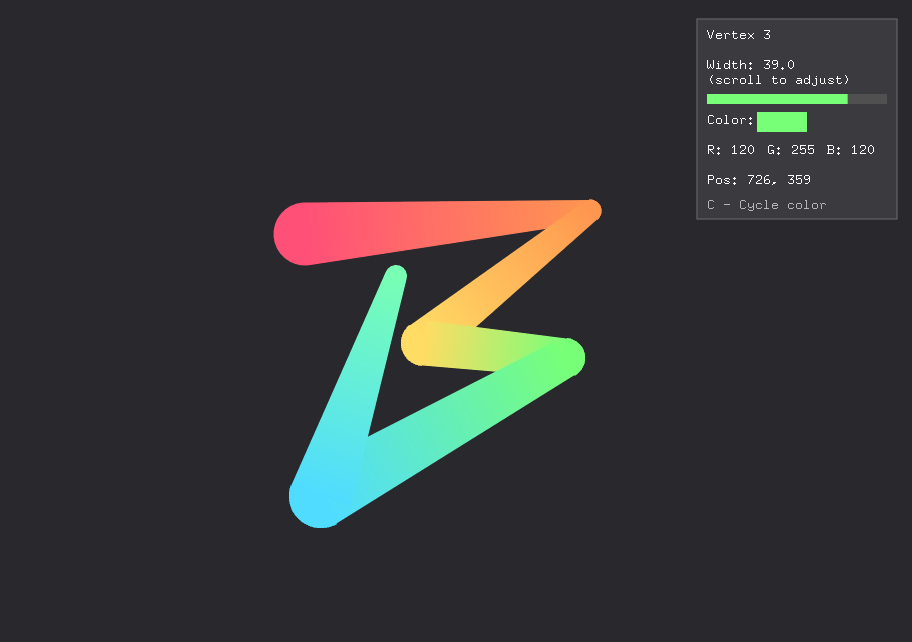
Features
- Stroke rendering - Anti-aliased polyline tessellation via triangle meshes
- Fill rendering - Polygon fill through the same renderer interface
- Variable width - Each vertex can have a different stroke width
- Variable color - Per-vertex colors with smooth interpolation
- Joint styles - Round, Bevel, and Miter (with configurable limit)
- Cap styles - Round, Square, and Butt
- GPU SDF path - Per-segment quad rendering with signed distance field fragment shader
- Calligraphy pen - Flat-nib envelope ribbon shader for blackletter-style strokes
- Catmull-Rom smoothing - Optional spline interpolation for silky curves
- Cross-platform - Uses openFrameworks' native mesh rendering
Quick Start
#include "ofxVaseRenderer.h"

ofxVaseRenderer::Renderer renderer;

void ofApp::setup() {
    renderer.setup();
}

void ofApp::draw() {
    ofxVaseRenderer::Polyline poly(points, colors, widths, opts);
    renderer.begin();
    renderer.draw(poly);
    renderer.end();
}
Configuration
Joint Styles
- Round - Smooth circular arc at turns (default)
- Bevel - Simple flat cut at turns
- Miter - Sharp pointed corners with configurable limit
Cap Styles
- Round - Semicircular end caps (default)
- Square - Extended rectangular caps
- Butt - Flat caps with no extension
ofxVaseRenderer::Options opts;
opts.joint = ofxVaseRenderer::JointStyle::Round;
opts.cap   = ofxVaseRenderer::CapStyle::Round;
opts.miterLimit = 4.0f;
Variable Width and Color
std::vector<glm::vec2> points = {{100,100}, {200,200}, {300,150}, {400,200}};
std::vector<ofFloatColor> colors = {ofFloatColor::red, ofFloatColor::yellow,
                                     ofFloatColor::green, ofFloatColor::blue};
std::vector<float> widths = {5, 20, 10, 30};

ofxVaseRenderer::Polyline poly(points, colors, widths, opts);
renderer.draw(poly);
Smoothing (Catmull-Rom Splines)
opts.smoothing = 4; // 4 subdivisions per segment0= no smoothing (default)1-2= subtle smoothing3-5= smooth curves6+= very smooth (more vertices)
GPU Rendering
if (renderer.gpuAvailable()) {
    renderer.drawGPU(points, colors, widths, feather, capStyle);
}
Calligraphy Pen
renderer.drawPenGPU(points, colors, nibWidth, nibAngleDeg, feather);License
BSD 3-Clause License - See LICENSE.txt