 ofxAddons

openFrameworks addon to autosave and autoload the ofApp window settings (position, size, FPS, fullscreen, stay on top, hide console window, center window ...etc)
Branches ahead of develop
These branches have commits not yet on develop — could be unmerged fixes or work in progress worth a look.
README
ofxWindowApp
Screenshot
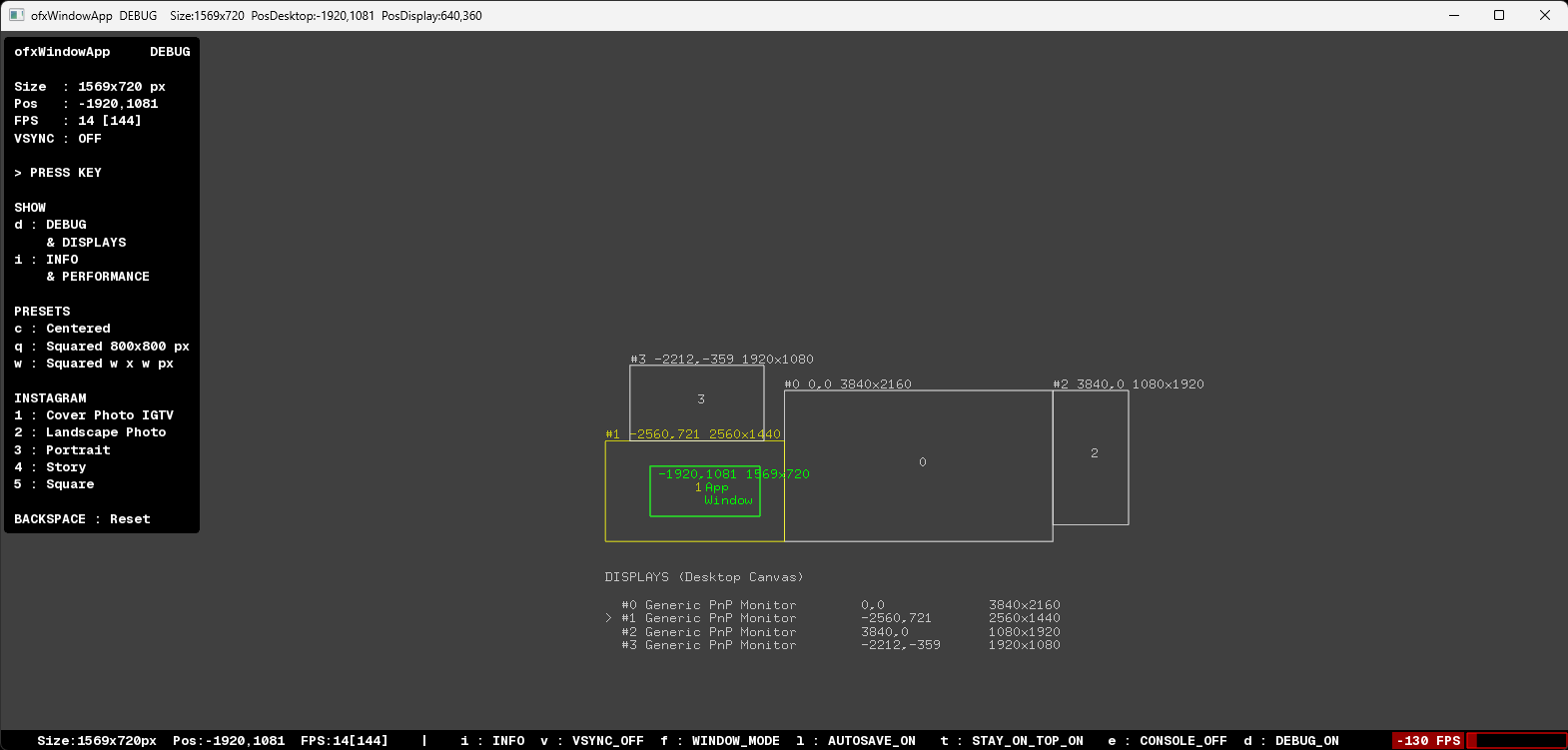
OVERVIEW
openFrameworks addon to auto store and recall the basic App Window state/settings:FEATURES
Window Position (x, y). Window Size (w, h). Window Mode (Windowed / Fullscreen). Window Target FPS (vs real current FPS). Window Vertical Sync state. Window Stay on Top mode, easy Console Window handler to show or hide. (Windows only yet) Window Presets with Key commands for shapes, squared, centered, default position./shape and common Instagram sizes. Easy change the app settings just by editing the JSON file (and restart app or even hot roloading), instead of requiring edit the app code. Alert display" HUD with a performance red bar when FPS drops too low under the expected Target Framerate. Preview a Desktop Canvas with all the connected Displays (OS monitors): indexes, name, size and position. Optional: custom TTF font for text display. Optional: hot reloading the JSON file when changed externally, usingofxWatcher.KEY COMMANDS
SHOW
d : Debug (& Displays).
i : Info (& Performance).

SETTINGS
f : Fullscreen / Windowed.
v : Vertical Sync (On/Off).
l : Disable autosave (Lock).
t : Stay-on-top (Windows only yet).
e : Console Window (Windows only yet).

PRESETS
c : Center Window.
q : Squared 800 x 800 px
w : Squared width x width px

INSTAGRAM
1 : Cover Photo IGTV
2 : Landscape Photo
3 : Portrait
4 : Story
5 : Square

BACKSPACE : Reset Default
WHY?
_Not only for thefinal user but also for the coder. Usually when you work on an OF project you want "to focus on your code updates", but you need to compile many times and move manually the app window out of your IDE window several times... Using this addon you can forget about this "annoying behaviour", as the App Window will be opened in the same position, size and some settings too._ USAGE
ofApp.h
``.c++ #include "ofxWindowApp.h" ofxWindowApp w;
ofApp.cpp
.cpp ofApp::setup() { w.setup(&w);
//----
// NOTE: // First time opening an app: // Default FPS is 60 fps. // Default vSync is disabled.
// OPTIONAL: // Custom init: w.setFrameRate(120); w.setVerticalSync(true); } Nothing more is required on update(),draw() or exit()!
All settings can be configured also using Key Commands.
The addon will auto load previous session settings when your App starts again, and will auto store settings too on any settings changes.
The JSON file (bin/data/ofxWindowApp/ofxWindowApp.json) will look like this:
.json [ { "position": { "x": -919.0, "y": 851.0 }, "size": { "height": 800, "width": 800 }, "window_mode": 0 }, { "Extra": { "Session": { "DisableAutoSave": "0", "Keys": "1", "ShowInfo": "1", "ShowInfoPerformanceAlways": "1", "StayOnTop": "1" }, "Window": { "FpsTarget": "144", "vSync": "1" } } } ] `
OPTIONAL DEPENDENCY
- ofxWatcher: Allows hot reloading the JSON file to edit file externally. (See
TESTED SYSTEMS
- Windows 11 / VS 2022 / OF 0.12.1
- macOS Sequoia 15.4 (Silicon ARM) / Xcode 16.2 / OF 0.12.1
AUTHOR
Addon by @moebiusSurfing ( ManuMolina ). 2020-2025.LICENSE
MIT License.Get this addon
Latest release
v0.2
published 1y ago