 ofxAddons

Real-time depth map generation addon for openFrameworks, optimized for ControlNet depth processing and AI image generation workflows.
Branches ahead of master
These branches have commits not yet on master — could be unmerged fixes or work in progress worth a look.
README
ofxSurfingDepthMap
Depth-map shader based add-on. Developed for seamless OF scenes integration with AI workflows and real-time 3D applications.
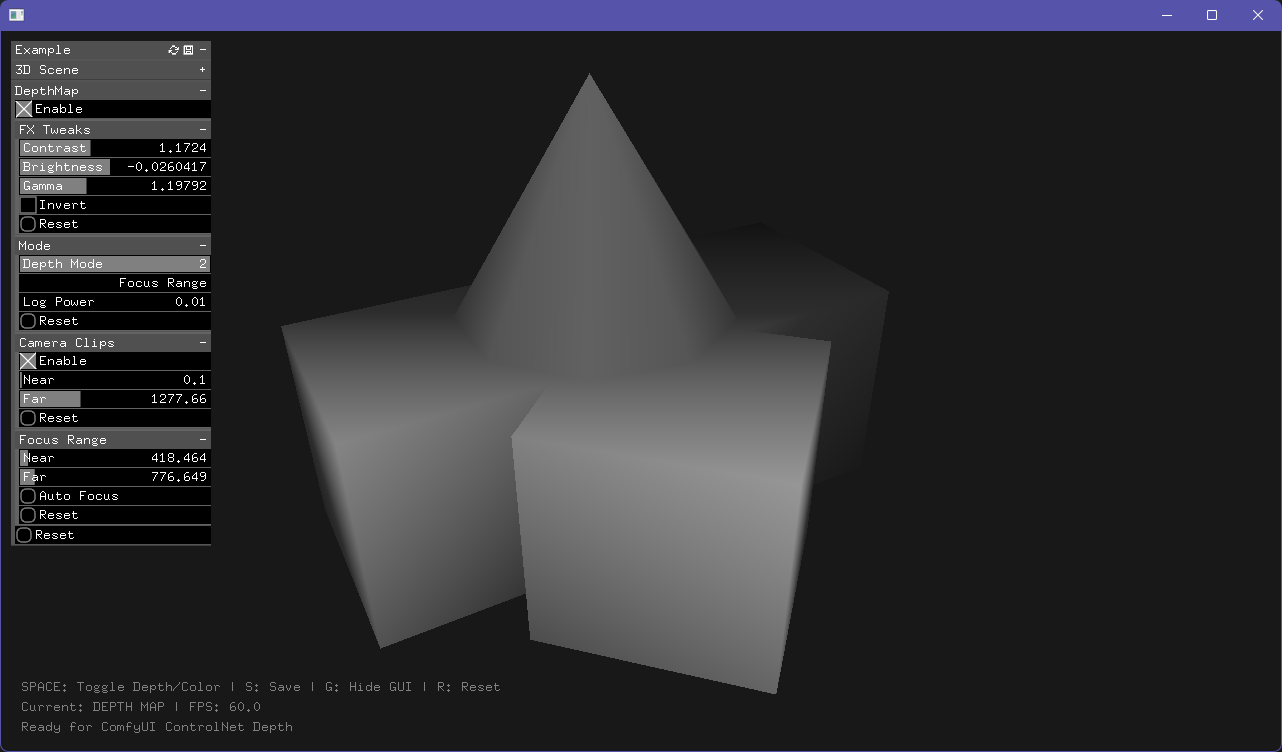
Features
- 3 Depth Mapping Modes: Linear, Logarithmic, and Focus Range
- Manual Camera Control: Bypass camera near/far planes with manual clipping
- Real-time Preview: Toggle between color and depth map rendering
- ControlNet Ready: Outputs grayscale depth maps suitable for AI processing
- Flexible Controls: Contrast, brightness, gamma, and inversion parameters
- Auto Focus: Intelligent depth range calculation for complex scenes
Quick Start
// ofApp.h

include "ofxSurfingDepthMap.h"

ofxSurfingDepthMap depthMap;
ofEasyCam camera;

//--

// ofApp.cpp

// setup()
depthMap.setup(&camera);

// draw()
depthMap.begin();
{
    camera.begin();
    {
        // Draw your 3D scene here
        drawScene();
    }
    camera.end();
}
depthMap.end();

depthMap.draw(0, 0);
Depth Modes
1. Linear Mode
Direct linear mapping from near to far planes. Best for simple scenes with uniform depth distribution.2. Logarithmic Mode
Applies logarithmic curve for better perspective handling. UseLog Power parameter to control curve aggressiveness (0.05 = subtle, 10.0 = extreme).3. Focus Range Mode
Concentrates contrast in a specific depth range, compressing everything else. Perfect for emphasizing specific subjects while de-emphasizing background/foreground.Key Parameters
Camera Clips
- Enable: Use manual near/far planes instead of camera settings
- Near/Far: Manual clipping plane distances
Focus Range
- Near/Far: Depth boundaries for high contrast zone
- Auto Focus: Automatically calculates optimal focus range based on current scene
Depth Tone
- Contrast: Enhances depth separation (1.0 = neutral)
- Brightness: Shifts depth map lighter/darker (0.0 = neutral)
- Gamma: Adjusts response curve (1.0 = linear)
- Invert: Flips depth mapping (close=black, far=white)
Example Controls
- SPACE: Toggle depth/color view
- S: Save depth map as PNG
- G: Toggle GUI visibility
- R: Reset
Workflow Tips
1. Start with Linear mode for quick setup 2. Enable Manual Clips for precise depth control (camera clips are often suboptimal) 3. Use Logarithmic mode when linear produces flat gray areas 4. Try Focus Range + Auto Focus for complex scenes with specific subjects 5. Adjust Contrast and Gamma after selecting the right mode
Technical Notes
- Output: 1024x1024 RGBA FBO (RGB channels contain grayscale depth)
- Depth calculation: View-space Z distance with proper perspective correction
- File format: PNG image with embedded depth information
- Export to custom folder (ie:
D:/ComfyUI/input/depthmaps/) - Shader requirements: OpenGL 3.3+ (shadersGL3 folder)
- Persistent settings
Installation
1. Clone to
openFrameworks/addons/ 2. Add the addon to your project when using Project Generator 3. Copy depth.vert and depth.frag to bin/data/shadersGL3/ 4. Include ofxSurfingDepthMap.h in your projectDependencies
- openFrameworks 0.12.0+
- ofxGui
Tested Systems
- Windows 11 / VS 2026 Insiders / of_v0.12.1_vs_64_release
- macOS Tahoe 26.0 / Xcode 26.0 / of_v0.12.1_osx_release
Use Cases
- ControlNet Depth: Generate depth maps for AI image generation
- Post-processing: Create depth-based effects and compositing
- Analysis: Visualize 3D scene depth distribution
- Prototyping: Quick depth visualization for 3D applications
ComfyUI Flux. DepthMap to render
<img width="512" height="512" alt="depthmap_2026-02-20-15-59-14-645" src="https://github.com/user-attachments/assets/20f1f9d5-148b-4972-b45f-f965b873f98b" /> <img width="512" height="512" alt="ComfyUI_00010_" src="https://github.com/user-attachments/assets/0f00207f-8d56-4fcf-837d-fcb1d467bde8" /> <img width="512" height="925.957" alt="Flux2-Klein_00021_" src="https://github.com/user-attachments/assets/c6a2fa7d-6964-4b3a-99b2-12044310677d" />TODO
- Fix GLSL 120.
Get this addon
Latest release
0.1
published 1y ago