 ofxAddons

Basic skeleton for a CMS based interactive installation made in OpenFrameworks
Forks
Forks pushed to more recently than local-projects/ofxApp itself, plus any admin-confirmed fork with commits of its own — worth checking if you're hitting issues with the original.

Branches ahead of master
These branches have commits not yet on master — could be unmerged fixes or work in progress worth a look.
main
feature/oauthAndMultiportTuio
feature/oauth20
feature/multiportTuio
feature/staticLib_OSX
test/globalsAgain
test/globals
README
ofxApp

What is _ofxApp_? Its a basic skeleton for an interactive CMS-driven installation made in OpenFrameworks. It tries to simplify your life by offering some basic common functionality required by most projects, trying to minimize the effort required on your side to get an installation up and running.
There are also some (slightly outdated) Slides that might help you understand what _ofxApp_ offers and how it works internally.
---
Table of Contents
<!-- TOC depthFrom:1 depthTo:6 withLinks:1 updateOnSave:1 orderedList:0 -->- ofxApp
- Table of Contents
- 0. Feature List
- 1. How To Use
- 1.1 Setup a project with all the required addons
- 1.2 Define Pre-Processor macro with your project name
- 1.3 Create files for your Global Variables
- 1.4 Make your ofApp class a subclass of ofxAppDelegate
- 2. ofxApp Functionality Coverage
- 2.1 The Configuration File - "ofxAppSettings.json"
- 2.2 ofxApp and Content
- 2.2.1 How does ofxApp Handle Content?
- 2.2.2 The Content JSON file structure
- 2.2.3 ofxApp Content Abstraction
- 2.2.4 Content Sources
- 2.2.5 Content Ingestion and Texture Loading Setup
- 2.2.5.1 std::function<void (ofxMtJsonParserThread::JsonStructureData &)> pointToObjects;
- 2.2.5.2 std::function<void (ofxMtJsonParserThread::SingleObjectParseData &)> parseOneObject;
- 2.2.5.3 std::function<void (ofxApp::CatalogAssetsData & data)> defineObjectAssets;
- 2.2.5.4 std::function<void (ContentObject)> setupTexturedObject;
- 2.2.5.5 Content Use Policies
- 2.2.6 Content Fail and Recovery
- 2.3 ofxApp Startup & Init stages
- 2.4 Static Textures loading Automation
- 2.5 Fonts
- 2.6 Globals and Parameter Tweaking
- 2.6.1 Globals File
- 2.6.3 Tweaking parameters with ofxRemoteUI
- 2.7 Dynamic Texture Loading
- 2.8 Maintenance Mode
- 2.9 Error Handling
- 2.9.1 On Screen Error
- 2.9.1 Terminate with Error
- 2.10 CMS Error Reporting
- 2.11 Analytics
- 2.12 PID file
- 2.13 Logging
- 2.14 TUIO - Multitouch Events
- 2.15 Http Downloads
- 2.16 Time Profiling
- Appendix
- ofxApp Keyboard Commands
- ofxApp MACROS
- Knowns Issues / Future Developments
- Included Libraries / assets
- License
0. Feature List
A quick summary of the features offered by _ofxApp_:
Startup / Loading Screen split up in user manageable phases with on screen progress (ofxStateMachine) CMS Asset download/cache/checksum management (ofxSimpleHttp, ofxAssets, ofxTagSystem) CMS JSON content loading & failover recovery (ofxJSON, ofxMTJsonParser) CPU & GPU profiler (ofxTimeMeasurements) Dynamic texture load / unload (ofxTexturedObject, ofxProgressiveTextureLoad) Logging to console, file & screen (interactive) (ofxSuperLog, ofxThreadSafeLog) Parameter Tweaking (ofxRemoteUI) Error Reporting to CMS (ofxSensu) Static Texture Assets preloading + access by fileName + live edits (ofxAutoTexture) Analytics (ofxGoogleAnalytics) Font rendering (ofxFontStash, ofxFontStash2) Multitouch setup (ofxTuio) Screen Management (fullscreen, windows, etc) (ofxScreenSetup) All the behaviours highly configurable from a single config file (ofxJsonSettings)
1. How To Use
1.1 Setup a project with all the required addons
ofxOSC, ofxXmlSettings, ofxOpenCV, ofxNetwork, ofxPoco, ofxFontStash, ofxFontStash2, ofxTuio, ofxJSON, ofxSuperLog, ofxAutoTexture, ofxMTJsonParser, ofxSimpleHttp, ofxTagSystem, ofxStateMachine, ofxAssets, ofxThreadSafeLog, ofxProgressiveTextureLoad, ofxTexturedObject, ofxMullion, ofxSensu, ofxGoogleAnalytics, ofxJsonSettings, ofxTimeMeasurements, ofxRemoteUI, ofxHistoryPlot, ofxScreenSetup, ofxInterface, ofxApp.
To do so, given the high number of addon dependencies, I suggest you use the OpenFrameworks Project Generator. This applies to Windows and OS X platforms.
Note: For an LP-styled repository, you can simplify the creation of your Xcode project by following these instructions instead. These instructions only walk through how to do this on OSX, but its also possible on Windows VS. Refer to AddonsExamples/ofxAppExample on the LP OpenFrameworks template repo to see how to set this up in Visual Studio.
Get OpenFrameworks 0.10.0 or newer, development is done against the OF github master branch. Launch the OF Project Generator for your platform and set it up. Set a "Project Path", where do you want to create your Project. Set a "Project Name", the name you want your project binary to have. Click "Generate" to create the project; keep Project Generator open. Go to ``
Your_Repo/ExternalAddons/ofxApp/` (or `/addons/ofxApp` if you use vanilla OF) and copy the file `addon_config.make` to your new project folder; and rename it to `addons.make`. Back to Project Generator, click on the "Project Path" text field once to make the app refresh - the addons list should update. Click on "Update" to re-create your project files. At this point, all the addons dependencies for _ofxApp_ should be covered. Add these PreProcessor Macros to your project: `USE_OFX_FONTSTASH`, `USE_OFX_FONTSTASH2`, `USE_OFX_HISTORYPLOT`, `NANOVG_GL2_IMPLEMENTATION` (\or NANOVG_GL3_IMPLEMENTATION) and `OFX_APP_NAME=xxxx` (where xxxx is your "Project Name" - see 1.2). Your project should compile cleanly now.

1.2 Define Pre-Processor macro with your project name
OFX_APP_NAME=MyApp
This is used to automatically handle your custom Global Variables file. This is so that your Global Vars class is automatically included in the _ofxApp_ instance. The whole point of this is to avoid dynamic casting all over the place just to acces your globals; this allows your globals object (MyAppGlobals) to be stored inside _ofxApp_ in their native Class, so they can be totally overridden by you and still be included in _ofxApp_ at compile time.
1.3 Create files for your Global Variables
This File must follow this naming convention; and it's where you will place global variables that you might need to access from anywhere. This file is only required if you defined `OFX_APP_NAME` in the previous step
OFX_APP_NAME + Globals.h
so, if your app is named MyApp, your file should be named "MyAppGlobals.h".
Those two files should be classes that inherit from a basic set of globals that _ofxApp_ defines for you; you just extend them with your own as your project grows.
Look at the example to see how they look like.
1.4 Make your ofApp class a subclass of ofxAppDelegate
This usually means your ofApp (a subclass of ofBaseApp, the basic OpenFrameworks app) should also subclass ofxAppDelegate, as shown here:
`c++ class YourApp : public ofBaseApp, public ofxAppDelegate{ }
By doing so, you are guaranteed to get some callbacks when certain things happen during the app launch.
---
2. ofxApp Functionality Coverage
_ofxApp_ covers a lot of areas, we will break them down in several sections. See table of contents.
2.1 The Configuration File - "ofxAppSettings.json"
_ofxApp_ contains lots of modules whose behaviors can be tweaked and configured. All those configurations are found in a single place, a JSON configuration file in data/configs/ofxAppSettings.json. This file is loaded when _ofxApp_ starts. There are a few main section within the config file:
App: all configs related to the app
framerate: int - the framerate at which _ofxApp_ (and your app) will operate
numAASamples: int [0..8] - the number of MultiSampling samples the window will be created with
showMouse: bool - if mouse cursor should be visible
enableMouse: bool - if mouse events should be enabled (useful to disable when TUIO is on to avoid double clicks)
maxThreads: int - the max number of CPU threads modules should spawn (should be <= the # of cores in your CPU)
window
windowMode: int - [0 .. 11] specifying a window mode for the window to start at. Some common values: [windowed=8, fullOneMonitor=1, fullAllMonitors=0]
customWidth : int - window width (applies when windowMode is 8 (windowed))
customHeight : int - window height (applies when windowMode is 8 (windowed))
customWindowPosition : bool - if true, the default window position will be overriden with the fields below
customPositionX : int - the x coord of the window position if customWindowPosition is true
customPositionY : int - the y coord of the window position if customWindowPosition is true
startupScreenViewport: 4 floats ["x", "y", "w", "h"] - normalized coords of where to constrain the startup loading screen within the window, will be { "x":0.0, "y":0.0, "w":1.0, "h":1.0 } in most cases.
renderSize: float {"width", "height"} - a target render size value for your convenience. Retrieve it from _ofxApp_ with ofxApp::get().getRenderSize();. It doesn't do anything internally, just for your convenience.
mullions: { "numX", "numY", "visibleAtStartup"} - define a bezels layout for your videowall. This is useful during development to overlay the bezels on your project, so you can design around them. Press 'M' to toggle them.
MaintenanceMode: read more about this in 2.8 Maintenance Mode
ErrorScreen : read more about this in 2.9 Error Handling.
TimeSampleOfxApp: bool - internal profiler for _ofxApp_ performance - usually set to false.
StateMachine: this section holds configs for the State Machine that controls the startup phases
onErrorRetryCount: int - if an error ensues (ie can't download JSON), how many times do we retry before failing?
onErrorWaitTimeSec: int - if an error ensues, how long do we hold the error message on screen before we retry?
Fonts: font loading - see section [2.5 Fonts] for more info on this.
StaticAssets:
textures: string - the location of your static textures (ie icons) - see section 2.4 Static Textures loading Automation
RemoteUI: various configurations for ofxRemoteUI.
TimeMeasurements: various configurations for ofxTimeMeasurements.
TextureLoader: Params that control texture loading performance. Read more about these in 2.7 Dynamic Texture Loading.
Logging: configs for logging; read more about those in 2.13 Logging.
ErrorReporting: setup CMS error reports, read more in 2.10 CMS Error Reporting.
GoogleAnalytics: configure the GoogleAnalytics client. Readm more in 2.11 Analytics.
TUIO: configure the TUIO server. If you have a touch overlay in your project, enable it and set the port to make _ofxApp_ forward multitouch events. Read more in 2.14 TUIO - Multitouch Events.
Downloads: This section configures the http client used throughout _ofxApp_, to download assets and content JSON, to send analytics, etc. Read more about the options in 2.15 Http Downloads.
Content: All configs related to the content used in your _ofxApp_ project.
JsonSources: This section holds the Content Sources your app will fetch every time its launched.
AssetDownloadPolicy: policies regarding when to download assets. Read more in 2.2.4.5 Content Use Policies.
AssetUsagePolicy: policies regarding when to use assets. Read more in 2.2.4.5 Content Use Policies.
ObjectUsagePolicy: policies regarding when to use or reject a content object. Read more in 2.2.4.5 Content Use Policies.
Those are the fields that MUST be present in your data/configs/ofxAppSettings.json file for ofxApp to operate. You will notice that _ofxApp_ will automatically terminate if any of those are missing or the JSON is malformed. It will show an error on the logs (and on screen) pointing at the field that is missing, or the line in which there's an error in the JSON syntax. You can always go look at the config files supplied with the examples if you can't figure out how to write yours, the most important lines are documented within the JSON.
This file is meant to be used to simplify your project's settings too. _ofxApp_ relies on two pillars to handle project settings; the most immutable settings (things like window size, fonts to load, logging, etc) usually end up going into this file, as it's mostly read at startup and the values it holds usually not change during the app's execution. Other settings that are more prone to being tweaked as _ofxApp_ runs (like debug booleans, runtime stats, and your own project's parameters) are better off being defined as globals using ofxRemoteUI, as that allows you to easily change their values as the app runs, save and load presets for them, and their state can be saved across launches. Read More about Globals and ofxRemoteUI in 2.6 Globals and Parameter Tweaking.
You can (and should) add any sections you need to this file to hold your settings, and then query the values you need using the following methods
To get a Boolean:
c++ bool myVal = ofxApp::get().getBool("mySection/mySubSection/myBoolValue");
To get an Integer:
c++ int myVal = ofxApp::get().getInt("mySection/mySubSection/myIntValue");
To get an Integer:
c++ float myVal = ofxApp::get().getFloat("mySection/mySubSection/myFloatValue");
To get a string:
c++ string myVal = ofxApp::get().getString("mySection/mySubSection/myStringValue");
To get an ofColor:
c++ ofColor myVal = ofxApp::get().getColor("mySection/mySubSection/myStringValue");
To check if a value is defined in the JSON:
c++ bool exists = ofxApp::get().settingExists("mySection/mySubSection/mySetting");
Also be aware that you can live-edit this file and re-load it while _ofxApp_ is running by pressing R on the keyboard.
2.2 ofxApp and Content
One of the goals of _ofxApp_ is to abstract content ingestion and sync with a remote CMS for you, lets see how it handles it.
2.2.1 How does ofxApp Handle Content?
_ofxApp_ allows you to go from a JSON sitting on an API endpoint, to a filtered
vector<YourContentObject*>` with all the assets listed in the JSON guaranteed to be on disk at the specified paths and ready to go.
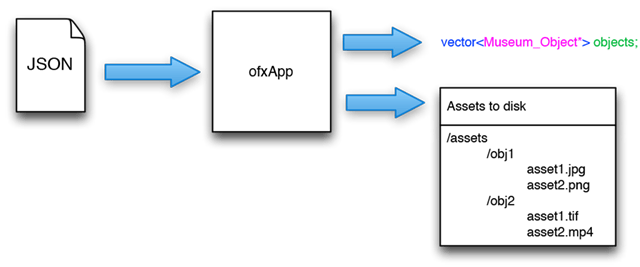
_ofxApp_ takes a divide an conquer approach to JSON parsing; it will break up the large JSON into lots of little JSON bits you can parse individually (one per each object defined in the JSON – one per each museum object). It does this for clarity, but also to be able to speed up the parsing of big JSON files by using threads.
_ofxApp_ will download, parse and split up the JSON file into N little bits of JSON (ofxJSONElement objects, a jsoncpp Json::Value wrapper) that will deliver to you one by one (through callbacks) so you can focus only in parsing what you need for each object, and create each one of your `MuseumObjects`` on each callback. You will write the code to parse each object, allowing to use or ignore whatever fields you need, or processing them as desired._ofxApp_ will also handle the rejection of invalid objects. What defines a "invalid object" can be configured, but it mostly boils down to assets referenced in the JSON not being there (wrong URL, 404, no URL