 ofxAddons

Live Apache ECharts views of openFrameworks data, with PNG and PDF capture.
README
ofxECharts
First working implementation of a small openFrameworks companion for Apache ECharts. The OF side publishes a complete JSON snapshot. A separate static server exposes the snapshot and supplied browser example.
openFrameworks → data.json → local static server → browser fetch() → EChartsThis implementation intentionally contains no HTTP server, socket, cloud synchronization, or browser-to-OF control path.
Included example
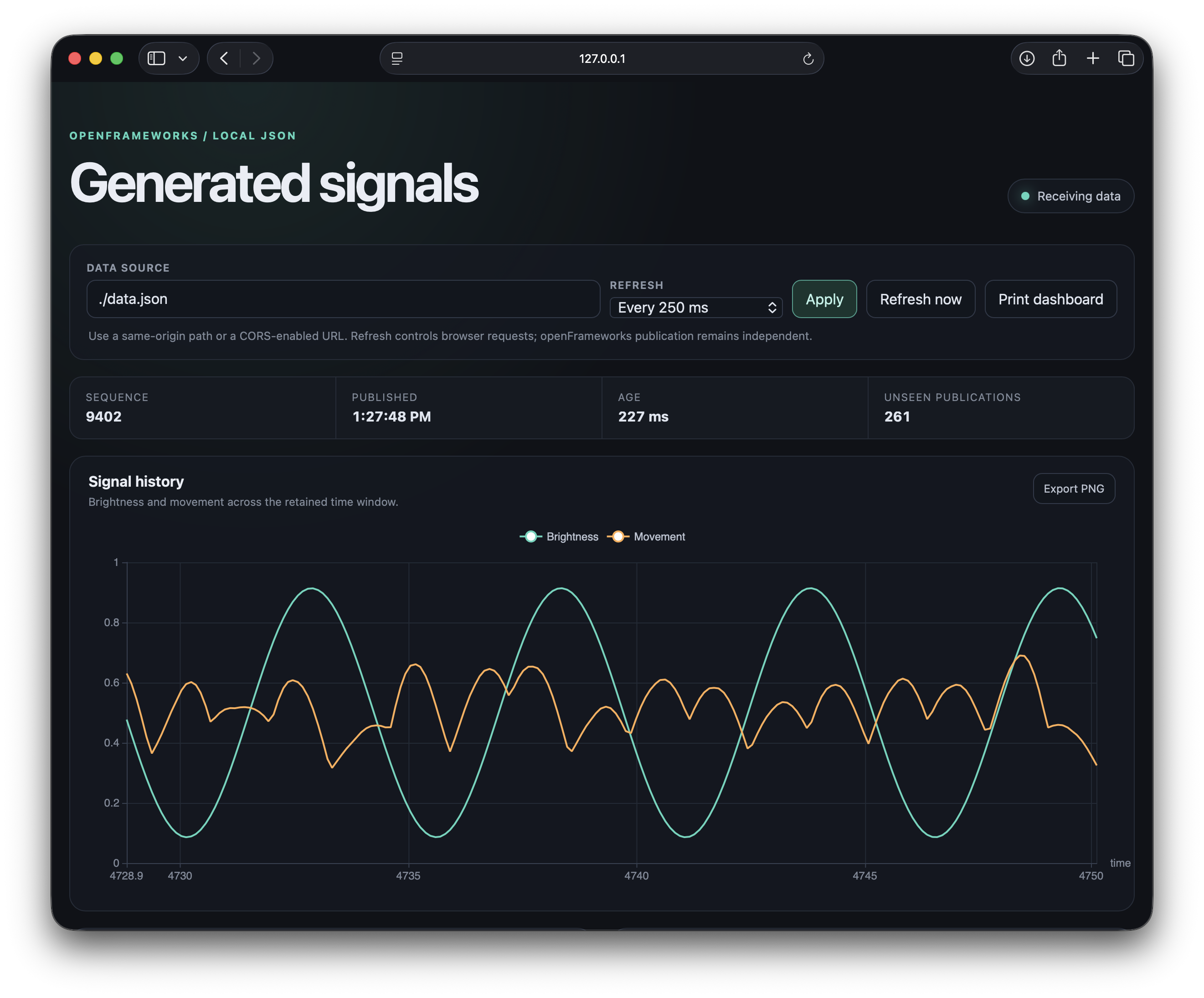
example-json-line-chart generates two signals, retains 200 samples, publishes every 500 ms, and displays them in OF and in an automatically updating ECharts dashboard. The dashboard shows a time-series chart, a brightness-versus-movement scatter chart, and a current-values bar chart from the same snapshot and the same browser request.The publisher validates dimensions and rows, writes a temporary file in the destination directory, and replaces the public snapshot. Temporary Windows sharing failures are retried on later OF updates without sleeping on the main thread. Each successful publication receives a sequence ID and UTC timestamp.
The browser makes one request at a time, bypasses its cache, validates responses, and keeps the last valid chart when publication stops.
Run the example
1. Clone
ofxECharts into the openFrameworks addons directory: cd OF_ROOT/addons
git clone https://github.com/leeMeredith/ofxECharts.git
example-json-line-chart and run it. 3. From the example directory, start a local server: python3 -m http.server 8000 --bind 127.0.0.1 --directory bin/data/web
On Windows,
py -3 can replace python3.4. Open <http://127.0.0.1:8000/>.
Opening
index.html directly through file:// will usually prevent the page from fetching data.json; use the local address.Dashboard controls
The dashboard accepts a same-origin JSON path or a full CORS-enabled URL in Data source. Refresh controls how often the browser requests that source; it does not change the OF publication interval. The available choices range from 250 ms through 5 seconds and include a paused state. The selected source and interval are reflected in the page URL so a view can be bookmarked.
Each chart has an Export PNG action. Print dashboard opens the browser's print dialog for printing or saving the complete view as PDF. Exported image filenames include the snapshot sequence ID.
All supplied charts are described by the
chartConfigs array near the beginning of app.js. Add another entry with a title, required dimensions, and an ECharts option builder to render another chart. A chart that derives a different dataset from the snapshot can also provide buildUpdate, as demonstrated by the current-values bar chart. The shared poller validates and distributes one snapshot to every configured chart.Use it in a Project Generator app
Create the app with Project Generator and select
ofxECharts. Keep the generated project files, Makefile, config.make, and bin directory. Project Generator adds ofxECharts to addons.make and references the add-on source from OF_ROOT/addons/ofxECharts/src; do not copy the add-on's src/ofxECharts. files into the app.To reproduce this example in the generated app, copy only:
example-json-line-chart/src/into the app'ssrc/example-json-line-chart/bin/data/web/into the app'sbin/data/web/
obj/ or a compiled .app. They are local build output and are regenerated by Make or Xcode.Minimal C++ use
ofxECharts publisher;

void ofApp::setup() {
    publisher.setup("web/data.json", 500);
}

void ofApp::update() {
    ofJson rows = {
        {0.0, 0.42, 0.12},
        {0.1, 0.46, 0.18}
    };
    publisher.setDataset({"time", "brightness", "movement"}, rows);
    publisher.update();
}
In an actual sketch, update the dataset when samples change rather than rebuilding it unnecessarily every frame. Call
publisher.update() every frame so scheduled publication and deferred replacement retries can run.Snapshot format
{
  "publishedAt": "2026-09-21T14:00:00.000Z",
  "sequenceId": 42,
  "dataset": {
    "dimensions": ["time", "brightness", "movement"],
    "source": [
      [0.0, 0.42, 0.12],
      [0.1, 0.46, 0.18]
    ]
  }
}
Every row must contain one value per unique dimension. Cells may contain strings, booleans, finite numbers, or
null.sequenceId counts successful publications. A browser may skip IDs because polling and publication run independently; skipped IDs do not necessarily mean samples were lost because each snapshot can contain a history.Performance
The supplied 200-row example was measured on an Apple M4 MacBook Air with openFrameworks 0.12.1. It updates the dataset at 10 Hz, publishes at 2 Hz, and runs at 60 FPS with VSync. The table reports 100 publications after 10 warm-up publications.
| Measurement | Release | Debug |
|---|---|---|
| Mean complete publication | 0.457 ms | 0.926 ms |
| 95th percentile publication | 0.629 ms | 1.237 ms |
Mean setDataset() validation and copy | 0.022 ms | 0.235 ms |
| Estimated add-on CPU, as a percentage of one core | 0.13% | 0.44% |
| Reported frame rate | 60.003 FPS | 60.002 FPS |
With both publication and browser refresh set to 500 ms, a changed dataset normally appears after about 500 ms on average and within about 1 second in the worst phase alignment. The file operation itself is sub-millisecond on the tested machine. Payload size, storage, machine load, and publication frequency will change these results.
See the benchmark record for the method, distributions, calculations, and scaling guidance.
Current boundary
The example is a local observation tool. The browser owns chart type, axes, series mappings, labels, and styling in
app.js. The add-on knows only the dataset contract.The initial implementation supports one writer and one snapshot file. It does not promise delivery of every publication, synchronized timing, remote hosting, authentication, or large media transfer.
Dependencies and licenses
The C++ add-on uses only openFrameworks. The example bundles Apache ECharts 6.1.0 for offline use. Its Apache 2.0 license and NOTICE are included beside the browser asset.
The add-on is MIT licensed. See
LICENSE.Verification status
- Repeatedly read while OF replaces the snapshot and confirm that readers receive complete JSON. The initial macOS check completed 91,774 reads with no malformed JSON while sequence IDs advanced from 31 through 36.
- The macOS recovery matrix passed for OF and server restarts, first-snapshot waiting, paused and manual refresh, missing and invalid sources, shorter datasets, and empty datasets.
- The 200-row Release and Debug benchmark is recorded in
docs/benchmark.md. - Verify macOS first, then Windows replacement and retry behavior before claiming Windows support.