 ofxAddons

openFrameworks addon for capturing video from Point Grey Research's Camera using FlyCapture SDK.
Forks
Forks pushed to more recently than katotetsuro/ofxFlyCapture itself, plus any admin-confirmed fork with commits of its own — worth checking if you're hitting issues with the original.

Branches ahead of master
These branches have commits not yet on master — could be unmerged fixes or work in progress worth a look.
README
openFrameworks addon for capturing video from Point Grey Research's Camera using FlyCapture SDK.
https://www.ptgrey.com/flycapture-sdk
This addon is tested under Windows only. (note:SDK for OSX is not provided.)
features not implemented currently request frame size pixel format
Install FlyCapture SDK windows 32bit copy header files inside C:\Program Files (x86)\Point Grey Research\FlyCapture2\include\ to ofxFlyCapture\libs\FlyCapture2\include sub-folder "C" and "FC1" are not necessary. copy library file C:\Program Files (x86)\Point Grey Research\FlyCapture2\lib\FlyCapture2.lib to ofxFlyCapture\libs\FlyCapture2\libvs\Win32\
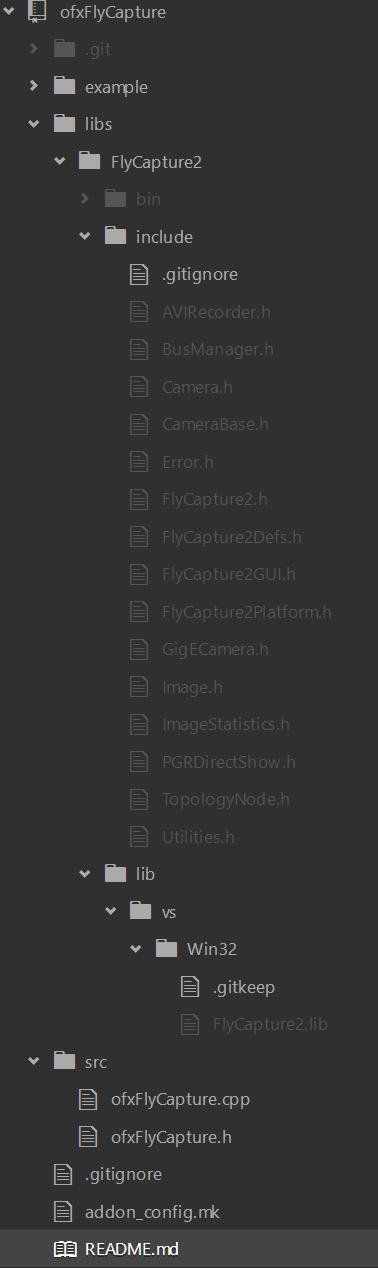
I recommend to use Project Generator. It is easy to setup include and library path To launch your app, C:\Program Files (x86)\Point Grey Research\FlyCapture2\bin\ should in your PATH environment variable, or FlyCapture2.dll should be in same folder of your exe file.
I don't know much about software license, but it seems better not to redistribute headers and libraries. http://www.ptgrey.com/Content/Images/uploaded/FlyCapture2Help/flycapture/07legal/softwarelicenseagreement.html
Grasshopper3 GS3-U3-23S6M (mono, USB3) Blackfly BFLY-PGE-13S2M (mono, GIGE)
https://www.ptgrey.com/flycapture-sdk
This addon is tested under Windows only. (note:SDK for OSX is not provided.)
features not implemented currently request frame size pixel format
How to use
Install FlyCapture SDK windows 32bit copy header files inside C:\Program Files (x86)\Point Grey Research\FlyCapture2\include\ to ofxFlyCapture\libs\FlyCapture2\include sub-folder "C" and "FC1" are not necessary. copy library file C:\Program Files (x86)\Point Grey Research\FlyCapture2\lib\FlyCapture2.lib to ofxFlyCapture\libs\FlyCapture2\libvs\Win32\
I recommend to use Project Generator. It is easy to setup include and library path To launch your app, C:\Program Files (x86)\Point Grey Research\FlyCapture2\bin\ should in your PATH environment variable, or FlyCapture2.dll should be in same folder of your exe file.
I don't know much about software license, but it seems better not to redistribute headers and libraries. http://www.ptgrey.com/Content/Images/uploaded/FlyCapture2Help/flycapture/07legal/softwarelicenseagreement.html
tested devices
Grasshopper3 GS3-U3-23S6M (mono, USB3) Blackfly BFLY-PGE-13S2M (mono, GIGE)
- FireFly MV FMVU-03MTM-CS (mono, USB2)