 ofxAddons

OpenFrameworks addon to manage scenes using an ensemble of ofxGui params.
Branches ahead of master
These branches have commits not yet on master — could be unmerged fixes or work in progress worth a look.
README
ofxSceneManagerGui
OpenFrameworks addon to manage scenes using an ensemble of ofxGui params. It works great in combination with ofxTransitionSlider.
Params
- startTime: time in ms of when scene needs to start
- name: name of the scene, it is print on the gui
- autoStart: if it true the scene starts automatically, if false the scene manager stop and you need to start manually.
- infinityTime: if true keep the current scene until you press the key to go to the next scene.
- transitionTime: time of all ofxTransitionSlider for that scene.
Consideration
For now, you have to create main scene manually, the scene manager allows you to generate only (sub) scenes using the keyboard. This could be improved in the future.
Examples
exampleSceneManger
A simple example to understand how to use the scene manager and how to organize files.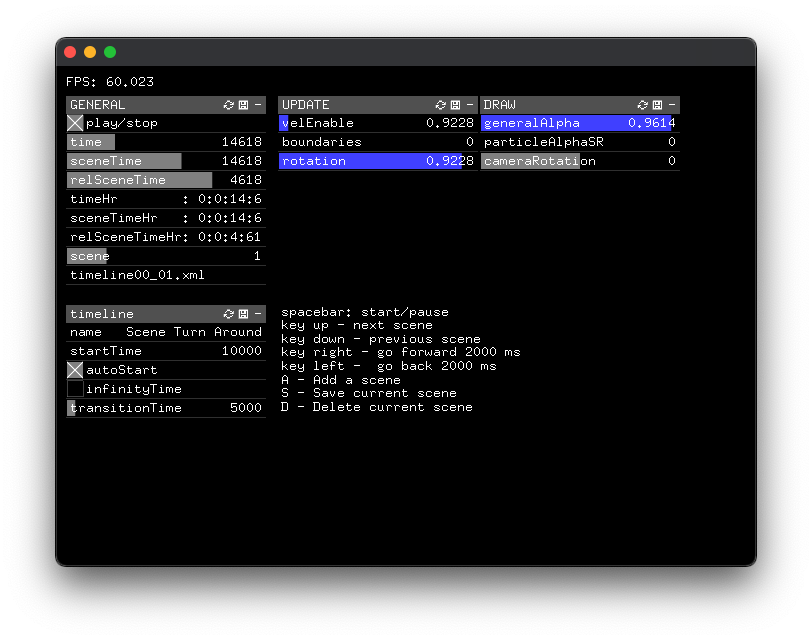
- exampleSceneAudio - TODO
- exampleSceneManagerGui-TransitionSliderFrameBased
- ofxSceneManagerGui-TimecodeLTC
Usage - SceneTime
The time (play) can be managed in 3 different modes:
- (default) ``
ofSystemTimeMillis`it uses the system time
- `
FrameBased`it ignores the time, but using the number of frames from a scene and another one. This is useful if you need to export a movie and your app has not have a constant framerate
- `
ExternalTimeMillis`it uses an external value to manage time. For example using timecode to control the scene time.
ofSystemTimeMillis ` and ` FrameBased ` at runtime. Using ` ExternalTimeMillis `` it is better to start the application in this mode (otherside behaviour is undefined).