 ofxAddons

openFrameworks addons ofxExtremeGpuVideo
Forks
Forks pushed to more recently than Ushio/ofxExtremeGpuVideo itself, plus any admin-confirmed fork with commits of its own — worth checking if you're hitting issues with the original.


Branches ahead of master
These branches have commits not yet on master — could be unmerged fixes or work in progress worth a look.
README
Extreme Gpu Friendly Video Format
what is this?
- Original file format optimized for random access at any frame
- Frame data is compressed DXT1, DXT3, DXT5 format
- Storage format is compressed by lz4
setup for example (optional)
$ cd scripts
$ ruby download_resource.rb
How to encode
We have to convert from image sequence to format(\.gv).If you don't have image sequence, you can encode to image sequence by ffmpeg. Please install ffmpeg by brew(osx) or chocolatey(windows). or png tiff sequence directly by like after effects or nearly tools.
1 (optional). create \
.gvintermediate(image seq) from any video file
$ cd scripts
$ ruby video_to_gvintermediate.rb footage.mov
2. Launch App Prebuild Binary Converter
https://github.com/Ushio/ofxExtremeGpuVideo/releases/tag/1.1.2for win: nvtt_bach_converter_win for mac: batch_converter_mac
but we recommend windows. nvtt encoder is fast, high quality. mac converter is little bit slow ("no lite mode" quality is maybe nearly nvtt)
for mac, has "lite mode" option is fast mode.(because encode is very slow)
3. select Alpha Mode
4. Drag and drop image sequence folder.
imageseq/image000.tiff imageseq/image001.tiff imageseq/image002.tiffplease drag and drop imageseq folder to window. NOT IMAGE FILES
and Press "Run" button.
Wait
have a breakHow to Play
Plase check example-player-win or example-player-osx Player algorithm is exactly same win, mac.ofxGvTexture is Newer, and simple.
binary file format (gv)
0: uint32_t width
4: uint32_t height
8: uint32_t frame count
12: float fps
16: uint32_t fmt (DXT1 = 1, DXT3 = 3, DXT5 = 5, BC7 = 7)
20: uint32_t frame bytes
24: raw frame storage (lz4 compressed)
eof - (frame count) * 16: [(uint64_t, uint64_t)..<frame count] (address, size) of lz4, address is zero based from file head
nvtt encoder supported https://developer.nvidia.com/gameworksdownload#?dn=gpu-accelerated-texture-tools-2-08
Prebuild Binary Converter
Latest 1.1.1https://github.com/Ushio/ofxExtremeGpuVideo/releases/tag/1.1.1
1.0.0
https://github.com/Ushio/ofxExtremeGpuVideo/releases/tag/1.0.0
Unity Package
https://github.com/Ushio/ofxExtremeGpuVideo/raw/master/Unity/gpuvideo.unitypackage
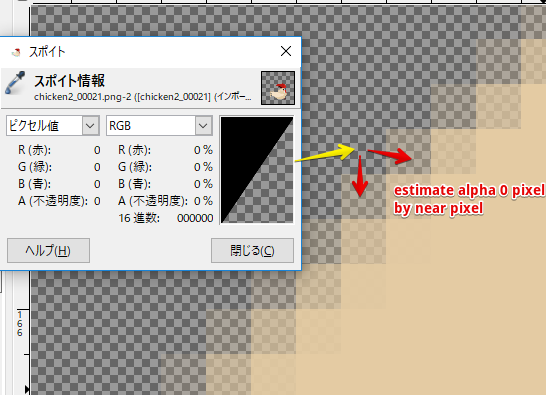
estimate alpha zero color
Directory information
| Directory | Description |
|---|---|
| batch_converter-osx | Recommended Encoder on macOS |
| batch_converter-win | Deprecated |
| bc7-encoder | Highly Experimental, Not Recommended |
| converter-osx | Deprecated |
| converter-win | Deprecated |
| example-player-osx | Recommended Example on macOS |
| example-player-win | Recommended Example on windows |
| gv_player-mac | Recommended Player on macOS |
| gv_player-win | Recommended Player on windows |
| nvtt-encoder | Recommended Encoder on windows |
| Unity | Recommended Player on unity |
Get this addon
Latest release
fix estimate alpha zero color Bug