 ofxAddons

openFrameworks wrapper around libVLC 4 with texture-based video output, playlist and transport controls.
Branches ahead of main
These branches have commits not yet on main — could be unmerged fixes or work in progress worth a look.
README
ofxVlc4
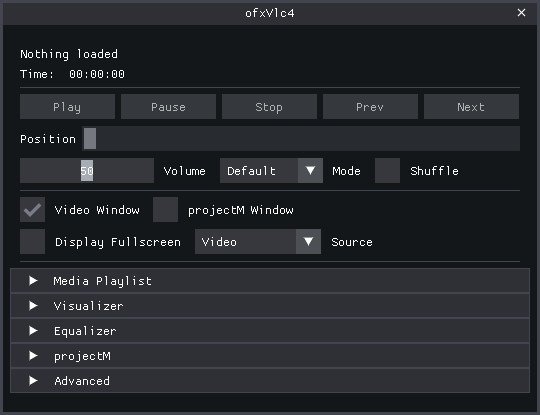
ofxVlc4 is an openFrameworks wrapper around libVLC 4 with a texture-based video path, optional native-window backends on Windows, playlist helpers, transport controls, media discovery, diagnostics, recording helpers, MIDI utilities, and a large GUI example.The main public header is:
src/ofxVlc4.h
vlc-help.txt- runtime-derived English
--help, used forHelp vlc-full-help.txt- runtime-derived English
--full-help, used forFullHelp
Note
Parts of this addon, its examples, GUI structure, and documentation were developed with AI-assisted help during implementation and refinement.
License
This addon is released under the MIT License.
Release
- addon release version:
1.1.0 - changelog:
CHANGELOG.md
Highlights
libVLC 4playback in openFrameworks- texture-based video output for OF rendering and shader pipelines
- optional Windows backends:
- native window output (
HWND) - D3D11 HDR metadata path
- optional Windows decoder-hardware preference for
Auto,D3D11,DXVA2,NVDEC, orNone - optional pre-init libVLC text-renderer settings for VLC-rendered subtitles
- playlist and playback helpers
- audio devices, audio output module selection, delays, EQ, mixmode
- video adjustments, deinterlace, crop, aspect, fit, overlays
- track, title, chapter, program, subtitle, and teletext control
- renderer/cast discovery and media discovery
- snapshots, thumbnails, native record, bookmarks
- texture recording helpers plus automatic current-window capture helpers
- watch-time, stats, logging, dialog callbacks, metadata editing
- optional high-level player-command dispatch for transport, disc navigation, and teletext color-key actions
- pre-init decoder hardware preference through
setPreferredDecoderDevice(...) - advanced pre-init override args through
setExtraInitArgs(...),addExtraInitArg(...), or rawinit(argc, argv)arguments - MIDI analysis, bridge, and local transport helpers
Source layout
The main public API stays in:
src/ofxVlc4.h
src/core/ofxVlc4.cppsrc/audio/ofxVlc4Audio.cppsrc/video/ofxVlc4Video.cppsrc/media/ofxVlc4Media.cppsrc/playback/ofxVlc4Playback.cppsrc/support/ofxVlc4Utils.h
src/recording/ofxVlc4Recorder.src/support/ofxVlc4RingBuffer.src/support/ofxVlc4MuxHelpers.hsrc/midi/ofxVlc4MidiAnalysis.src/midi/ofxVlc4MidiBridge.src/midi/ofxVlc4MidiPlayback.src/core/ofxVlc4Types.hsrc/core/ofxVlc4Impl.hsrc/core/VlcCoreSession.src/core/VlcEventRouter.src/media/MediaLibrary.src/media/MediaLibraryState.hsrc/playback/PlaybackController.*src/playback/PlaybackTransportState.h
Clone / install quick start
Clone the addon into your openFrameworks
addons folder:git clone https://github.com/Jonathhhan/ofxVlc4.gitThen install the bundled
libVLC layout:bash scripts/install-libvlc.shOn Windows, that script now prepares each example directly for Project Generator users:
bin/libvlc.dllandbin/libvlccore.dllbin/plugins/bin/lua/dll/x64/with only the root VLC DLLs for generated-project staging
bin/data. Drop your own media into an example's bin/data, drag a file in at runtime, or use the standard openFrameworks sample video from examples/video/videoPlayerExample/bin/data/movies/fingers.mp4.Installing libVLC
The addon ships with a single cross-platform shell entry point that installs
libVLC headers/import libs into libs/libvlc and the shared Windows runtime into runtime/vs/x64.If you want one shell entry point across supported environments, use:
bash scripts/install-libvlc.shThe script dispatches to:
- macOS: native installer path for
VLC.app - Git Bash / MSYS / Cygwin / WSL on Windows: embedded PowerShell installer for the nightly ZIP
- native Linux: no local installer, use system
libvlcpackages viapkg-config
Windows
Run:
bash scripts/install-libvlc.shThis installs:
- headers into
libs/libvlc/include - import library into
libs/libvlc/lib/vs - one shared runtime into
runtime/vs/x64 - linked file-tree runtime views into the example
binfolders - linked file-tree
dll/x64staging folders for generated project workflows
bin includes:libvlc.dllandlibvlccore.dllin thebinrootplugins/as a real subfolderlua/as a real subfolder
bin, that is a staging/build-layout problem rather than the intended release layout.For normal addon development, keep the shared Windows runtime in
runtime/vs/x64 and let the examples link to it locally. Only copy the VLC runtime into your app output if you want a truly standalone distribution.The installer works in a temporary directory outside the addon tree, which is helpful when the addon lives in a synced or otherwise path-sensitive folder.
macOS
Run:
bash scripts/install-libvlc.shor point it at a specific app bundle:
bash scripts/install-libvlc.sh --vlc-app /Applications/VLC.appThis installs:
- headers into
libs/libvlc/include libvlc.dylibandlibvlccore.dylibintolibs/libvlc/lib/osx/lib- plugins into
libs/libvlc/lib/osx/plugins - runtime and plugins into each example's
bin/data/libvlc/macosfolder
install_name_tool, and the addon adds matching @rpath entries for:@executable_path/../Resources/data/libvlc/macos/lib@executable_path/../data/libvlc/macos/lib
VLC_PLUGIN_PATH to data/libvlc/macos/plugins, so both the loader path and plugin discovery path point at the staged example runtime.The macOS path is meant for the default texture backend. The Windows-only
HWND and D3D11 output modes are not used on macOS.Linux / WSL
Run:
bash scripts/install-libvlc.shIn WSL or Git Bash on Windows, this wrapper calls the Windows PowerShell installer. On native Linux it exits with a reminder to use system
libvlc packages instead.Native Linux
Install VLC 4 and libVLC development packages through your package manager. On Linux the addon links through
pkg-config.Example dependencies
The full example also depends on:
ofxProjectMofxImGuion itsdevelopbranch
git clone --branch develop https://github.com/jvcleave/ofxImGui.gitExamples
ofxVlc4QuickStart⭐ NEW - Start here!- minimal single-file example in ~90 lines of code
- perfect for learning basics and quick prototyping
- drag-and-drop playback with simple controls
- see ofxVlc4QuickStart/README.md
ofxVlc4Example- full GUI, previews, projectM integration, diagnostics, subtitle loading/track control, and an optional OF-drawn
.srtoverlay with selectable TTF fonts - includes a dedicated
DVD / Disccontrol section for title/chapter/program navigation and menu buttons, while teletext lives underTracks & Subtitles - example anaglyph shaders are now owned by the addon under
src/video/shadersinstead of the examplebin/datatree ofxVlc4360Example- focused ImGui-based 360 / panoramic playback example with projection, stereo mode, live viewpoint controls, and lightweight playlist/folder drop support
- includes a helper download script for free 360 sample media
ofxVlc4MidiExample- smaller ImGui-based MIDI/media example with local MIDI transport, sync, export, and
ofxMidiOutrouting - expects the
ofxMidiaddon for device output ofxVlc4RecorderExample- focused recording example with an ImGui recorder panel, native record, session-based texture/window capture, muxing, and recorder readback metrics
- includes recording presets for
H265 / HEVC,MKV / Opus, andMKV / LPCM H265 / HEVCrecording currently requires one of theMKVmux profilesH265 / HEVCrecording normalizes capture sizes to the bundled x265 alignment before encoding (width % 16 == 0,height % 8 == 0)
ofxProjectM as the primary integrated path. Bundled VLC visualization plugins remain available through the staged runtime, but they should currently be treated as experimental libVLC runtime extras rather than as the main addon feature path.For the examples, also see:
- ofxVlc4QuickStart/README.md ⭐ Start here for basics
- ofxVlc4Example/README.md
- ofxVlc4360Example/README.md
- ofxVlc4MidiExample/README.md
- ofxVlc4RecorderExample/README.md
Subsystem quick reference
- playlist
- addon-owned queue/state API for UI, transport, and metadata-aware item access
- see
Structured playlist APIbelow - recorder
- addon-owned session start/stop/finalize/mux flow for texture and window capture
- see
Structured recorder APIbelow - MIDI
- addon-owned local MIDI transport, analysis, sync, and output callback routing
- see
Structured MIDI APIbelow - playback clock
- high-resolution watch-time state/callbacks plus timecode formatting helpers
- see
Structured playback clock APIbelow - backend routing
Textureis the default OF-integrated path, whileNativeWindow / HWNDis where libVLC-native video filters/effects apply- see
Backend capability notesbelow
doxygen in the repository root (output: docs/api/html/index.html).Migration Guide: Transitioning from
ofVideoPlayer? See docs/MIGRATION_FROM_OFVIDEOPLAYER.md for a complete migration guide with API mapping and code examples.Contributing: Interested in contributing? See CONTRIBUTING.md for development workflow, code standards, and testing guidelines.
Simplified APIs: For simpler use cases, check out the facade classes in
src/facade/: ofxVlc4SimplePlayer- Essential playback methods (~15 methods vs ~400)ofxVlc4SimpleRecorder- Easy recording with quality presets- See
src/facade/README.mdfor examples
Minimal API
For the stable texture-based workflow, the recommended order is:
ofxVlc4 player;

void ofApp::setup() {
    player.setAudioCaptureEnabled(true);   // optional, before init()
    player.init(0, nullptr);
    player.setWatchTimeEnabled(true);      // optional, recommended for UI/transport
    player.setWatchTimeMinPeriodUs(50000); // optional

    player.addPathToPlaylist(ofToDataPath("movie.mp4", true));
    player.playIndex(0);
}

void ofApp::update() {
    player.update();
}

void ofApp::draw() {
    player.draw(0, 0, ofGetWidth(), ofGetHeight());
}

void ofApp::exit() {
    player.close();
}
For advanced libVLC startup overrides, the addon now supports both typed pre-init settings and raw argument escape hatches:
- typed settings first:
setPreferredDecoderDevice(...)setSubtitleTextRenderer(...)setSubtitleFontFamily(...)setSubtitleTextColor(...)setSubtitleTextOpacity(...)setSubtitleBold(...)- raw
init(argc, argv)arguments after the typed settings - stored extra args last through:
setExtraInitArgs(...)addExtraInitArg(...)clearExtraInitArgs()
Useful state getters:
getMediaReadinessInfo()getPlaybackStateInfo()getAudioStateInfo()getVideoStateInfo()getWatchTimeInfo()
play()pause()stop()nextMediaListItem()previousMediaListItem()
getPlaylistStateInfo()getPlaylistItems()getCurrentPlaylistItemInfo()
getMediaSlaves()addMediaSlave(type, uri, priority)addSubtitleSlave(uri, priority)addAudioSlave(uri, priority)clearMediaSlaves()getPlaylist()
getPlaylistStateInfo()- coarse playlist state for UI and transport gating
- includes
items,currentIndex,hasCurrent,size,empty getPlaylistItems()- full item list with addon-owned labels and flags
getCurrentPlaylistItemInfo()- convenience getter for the current playlist item without separate index lookups
getPlaylist()- compatibility/raw path list, still available when older code wants the original vector shape
recordVideo(...)recordAudio(...)recordAudioVideo(...)beginWindowRecording(...)endWindowRecording()startRecordingSession(...)startTextureRecordingSession(...)startWindowRecordingSession(...)stopRecordingSession()getRecordingSessionState()getRecordingPreset()setRecordingPreset(...)setPosition(...)setVolume(...)toggleMute()
startRecordingSession(...)- addon-owned session start for texture/window recording, audio source, and mux-on-stop behavior
startTextureRecordingSession(...)/startWindowRecordingSession(...)- convenience entry points for the two common capture sources
stopRecordingSession()- unified stop path that drives capture stop, finalize, and any configured post-stop mux
getRecordingSessionState()- coarse recorder lifecycle state for UI and shutdown handling
getRecordingPreset()/setRecordingPreset(...)- codec, mux, size, FPS, bitrate, and cleanup defaults carried as one addon preset object
- legacy
recordVideo(...)/recordAudio(...)/recordAudioVideo(...) - still available for direct/manual workflows, but the session API is the cleaner path for new code
loadMidiFile(...)- load a local MIDI file into the addon's transport and analysis path
playMidi()/pauseMidi()/stopMidi()/seekMidi(...)- addon-owned local MIDI transport controls
getMidiTransportInfo()- coarse transport state for UI and routing decisions
setMidiMessageCallback(...)- addon-owned dispatch callback for MIDI output, including normal channel voice messages and SysEx
setMidiSyncSettings(...)- configure MIDI Clock / MTC quarter-frame behavior
setMidiSyncSource(...)/setMidiSyncToWatchTimeEnabled(...)- couple MIDI transport timing to local playback transport and optional libVLC watch-time updates
getMidiAnalysisReport()- structured MIDI analysis/report surface for UI and export
setWatchTimeEnabled(...)/setWatchTimeMinPeriodUs(...)- enable libVLC watch-time updates and choose the callback cadence
getWatchTimeInfo()- latest high-resolution playback clock state for UI, sync, and transport logic
setWatchTimeCallback(...)- optional callback surface for apps that want push-style timing updates
formatCurrentPlaybackTimecode()/formatPlaybackTimecode(...)- helper formatting for
HH:MM:SS:FF-style display using the current playback FPS when available getPlaybackClockFramesPerSecond()- current FPS estimate used for timecode-style formatting
- addon version
getAddonVersionInfo()- startup/readiness
getMediaReadinessInfo()getPlaybackStateInfo()getVideoStateInfo()- audio/video state snapshots
getAudioStateInfo()getVideoStateInfo()getRendererStateInfo()getSubtitleStateInfo()getNavigationStateInfo()- subtitle rendering
- subtitle tracks can be selected and displayed inside the OF app through libVLC's subtitle renderer
- external subtitle/audio attachments can be added through
addSubtitleSlave(...),addAudioSlave(...), or the genericaddMediaSlave(...) - VLC-rendered subtitle styling can be configured before init through
setSubtitleTextRenderer(...),setSubtitleFontFamily(...),setSubtitleTextColor(...),setSubtitleTextOpacity(...), andsetSubtitleBold(...) ofxVlc4Examplealso includes an optional.srtparser + OF overlay path when you want subtitle strings rendered with OF fonts instead of VLC's own subtitle renderer- texture workflow
getTexture()getRenderTexture()- diagnostics/timing
getWatchTimeInfo()getMediaStats()getLibVlcLogEntries()
Recommended projectM assets
For the
ofxProjectM-powered parts of the full example, these packs are recommended:Download them with:
bash ofxVlc4Example/scripts/download-projectm-assets.shPlace them like this:
- presets from
presets-cream-of-the-cropgo in thepresetsfolder - textures from
presets-milkdrop-texture-packgo in thetexturesfolder
Notes
- The default path is still the OF texture backend.
- The recent internal source split does not require
addon_config.mkchanges because openFrameworks auto-scanssrc.
Backend capability notes
Texture- default and most integrated addon path
- best fit for OF drawing, custom shaders, recorder texture capture, and safer real-time adjustments
- libVLC video-filter chains are intentionally not pushed live on this backend
NativeWindow / HWND- Windows-only alternate output path
- best fit for libVLC-native video filters/effects and other vout-driven behavior
- less integrated with OF texture/shader workflows
D3D11 / HDR metadata- Windows-only specialist path for HDR/output experimentation
- not the normal addon workflow and best treated as an advanced backend
Known limits
- libVLC-native video-filter chains are intentionally disabled on the
Texturebackend because that path has been crash-prone in practice - the safest real-time video-adjustment path is still the addon fallback on
Texture; libVLC-native live effect changes belong onNativeWindow / HWND - recorder workflows are stable, but they are still the most timing-sensitive subsystem and benefit from real app-level testing when you change size, FPS, codec, mux profile, or backend
- Windows-specific alternate backends like
NativeWindow / HWNDandD3D11are feature paths, not the addon's default portability story
Critical paths
- playback-time diagnostics, timecode/FPS formatting, and track refreshes are the most sensitive live-query paths during active playback; the addon now prefers cached state there instead of probing libVLC aggressively every frame
- recorder shutdown and capture cleanup are still worth treating carefully because they combine libVLC teardown, texture ownership, and GL context lifetime
ofxVlc4360Examplenow keeps the simplerSpherepath as the default and leaveslibVLC 360available as the reference/native path
Startup State Model
For startup-sensitive apps, the addon now distinguishes a few early playback phases instead of treating them as the same thing:
media attached- a media object is already bound to the pl