 ofxAddons

General-purpose application layout using ofxImGui. (not so simple)
README
ofxSimpleApp
A multi-purpose application layout for quickly setting up OpenFrameworks projects, powered by ofxImGui.
It aims to get you started quickly for both drafts and performance applications. It focusses on minimising the workflow for advanced use-cases, using simplicity where possible when it doesn't restrict the user. It is my personal ofApp base class that I use across many projects, I hope it's useful for you too. WIP.
Demo :
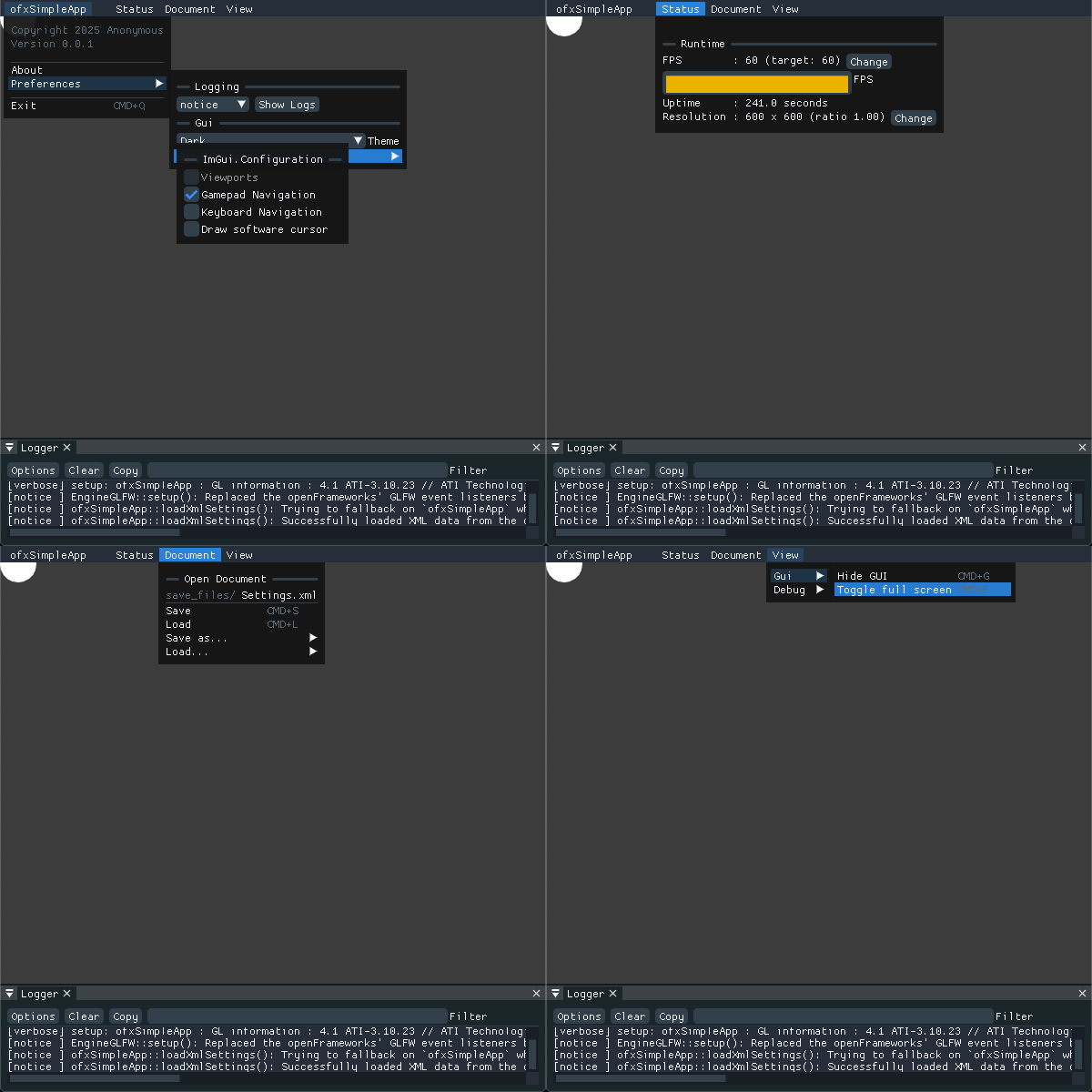 Video of an ofxSimpleApp
Features
- Minimal by default, fine-tuneable using a simple opt-in based config file.
- A basic but highly customiseable application GUI layout with a menu, some common keybindings and metrics to get your app going quickly.
- Save/Load system for retrieving settings using either TinyXml or PugiXml (default).
- A canvas class wrapping a rendering FBO displayed in your window.
- An "About" window with application and build information.
- Recording and export options (NDI, Syphon, Movie + PNG Recordings).
- Debugging features:
- An in-app console to keep an eye on the internal logs during runtime.
- ImGui debuggers for GUI debugging.
- Tracy integration for in depth profiling.
- ofxTimeMeasurements integration for quick profiling.
- Easy integration of various addons :
- Todo
Requirements
You need the following addons for running the default configuration : Depending on your configuration's opt-ins, you'll need some extra addons with your project. Please refer to the Configuration section below for correspondance with the config flags.
- leadedge/ofxNdi + ofxImGuiAddonWidgets
- astellato/ofxSyphon
- NickHardeman/ofxFastFboReader _(Sorry, a fork of a fork, maybe the original works too)_
- armadillu/ofxTimeMeasurements
- Daandelange/ofxFFmpegRecorder _(Sorry, a fork of a fork)_
- Daandelange/ofxPugiXML _(Sorry, a fork of a fork)_
- Daandelange/ofxPlayhead
- Daandelange/ofxImGuiAddonWidgets
- roymacdonald/ofxGLWarper
Compatibility
Tested with OpenFrameworks 0.12 on macos.
Installation
Add ofxSimpleApp and ofxImGui to your project, then inherit your
ofApp from ofxSimpleApp instead of ofBaseApp. Now you're ready to go for the minimal experience !Configuration
Basically you need to configure which features you'd like to use by enabling their respective config flags, and sometimes add the required addons to your project.
- Option 1 : Put the required flags into a file
ofxSaUserConfig.hand tell ofxSA where to find it (_see below_). - Option 2 : Add the required opt-in flags to your project compilation defines one by one.
| Config flag | Required ofxAddons | Description |
|---|---|---|
| Test | Test | Test |
| ofxSA_XML_ENGINE=ofxSA_XML_ENGINE_TINYXML | ofxXmlSettings | Use ofxXmlSettings as storage engine for saving sessions. (Unsupported) |
| ofxSA_XML_ENGINE=ofxSA_XML_ENGINE_PUGIXML | ofxPugiXML | Use libPugiXML as storage engine for saving sessions. |
| ofxSA_XML_FILENAME | Default filename for loading and saving sessions. | |
| ofxSA_XML_FOLDER | Folder where all session XML files are located. | |
| ofxSA_GLOBAL_XML_FILENAME | Default filename for loading and saving global application settings. | |
| ofxSA_ENABLE_GLOBAL_XML | ofxPugiXml | To enable a global app settings savefile. Default=1, set to 0 to disable. |
| ofxSA_SYPHON_OUTPUT | ofxSyphon | Outputs the canvas/ofAppWindow to Syphon. Macos only. |
| ofxSA_SYPHON_NAME_MAXLEN | Max length of a Syphon server. (verbose) | |
| ofxSA_CANVAS_OUTPUT_ENABLE | _None_ | Enables an fbo for rendering content, with GUI navigation and export/output. |
| ofxSA_CANVAS_OUTPUT_DEFAULT_WIDTH | Default canvas width. | |
| ofxSA_CANVAS_OUTPUT_DEFAULT_HEIGHT | Default canvas height. | |
| ofxSA_TIMELINE_ENABLE | _None_ | Enables a timeline GUI + utility for offline or real-time playback. |
| ofxSA_TIMELINE_AUTOSTART | ||
| ofxSA_TIMELINE_SINGLETON | Either to use the timeline as singleton. _(Unsupported set to false)_ | |
| ofxSA_TIMELINE_PAUSE_KEY | (verbose) | |
| ofxSA_TEXRECORDER_ENABLE | ofxFFmpegRecorder | Support for recording the ofAppWindow/canvas. |
| ofxSA_TEXRECORDER_DEFAULT_CODEC | ||
| ofxSA_TEXRECORDER_DEFAULT_FILENAME | ||
| ofxSA_TEXRECORDER_DEFAULT_OUTPUT_FOLDER | ||
| ofxSA_TEXRECORDER_USE_OFXFASTFBOREADER | ofxFastFboReader | Either to use ofxFastFboReader (faster) or Openframeworks GPU->CPU transfers. |
| DEFAULT_TEXTURE_RECORDER_CONTAINER_EXT | (verbose) | |
| ofxSA_TIME_MEASUREMENTS_ENABLE | ofxTimeMeasurements | Enables ofxTimeMeasurements integration for profiling/monitoring your ofApp. |
| ofxSA_TIME_MEASUREMENTS_TOGGLE_KEY OF_KEY_PAGE_DOWN | (verbose) | |
| ofxSA_TIME_MEASUREMENTS_TOGGLE_KEY_NAME | (verbose) | |
| ofxSA_TIME_MEASUREMENTS_AUTO_ENABLED | Auto-start on launch. | |
| ofxSA_NDI_SENDER_ENABLE | ofxNDI | Outputs the canvas/ofAppWindow to NDI. |
| ofxSA_NEWFRAME_FLAGGER | Helper for detecting new frames. Also adds a Syphon option for only publishing new frames. | |
| ofxSA_QUADWRAPPER_ENABLE | ofxQuadWarper | Enables quad wrapping on the output canvas. |
| ofxSA_CANVAS_OUTPUT_EXTRA_STANDALONE_WINDOW | Adds a 2ndary, standalone output window |
ofxSaUserConfig
The ProjectGenerator erases project config settings / defines. For this reason, it's recommended to set them in a separate file (option 1). After using the PG on a project or example, you have to tell your compiler where this config file is by defining a macro constant :
ofxSA_CONFIG_HEADER_FILE=ofxSAUserConfig will load ofxSAUserConfig.h. Refer to example-advanced/src/ofxSAUserConfig.h for a template. Alternative: ofxSA_CONFIG_HEADER_FILE="ofxSAUserConfig.h". (works better in XCODE)In XCode projects add these to the "Other C Flags" and "Other C++ Flags" in your project settings :
-DofxSA_CONFIG_HEADER_FILE="ofxSAUserConfig.h"
-DofxAddons_ENABLE_IMGUI
In Qt-Creator, add this to your
.qbs of.defines: [
'ofxSA_CONFIG_HEADER_FILE=ofxSAUserConfig',
'ofxAddons_ENABLE_IMGUI', // if using ofxImGui
],
In Makefiles, add this to
config.make : PROJECT_DEFINES = ofxSA_CONFIG_HEADER_FILE=ofxSAUserConfig
PROJECT_DEFINES += ofxAddons_ENABLE_IMGUI
Examples
- example-simple : The minmal beare bones of ofxSimpleApp.
- example-advanced : The full blown version of ofxSimpleApp using all opt-ins.
Alternative usage
ofxSimpleApp embeds a few useful classes, you can use them by including the appropriate files from your project. Maybe some addons like ofxImGui are required. Configuration applies.
Future ideas
- A global keyboard shortcut system for registering actions ?
Contributing
ofxSimpleApp tries to simplify the creative process working with OpenFrameworks. Many features and addon integrations are probably missing or to be improved. Contributions are welcome, feel free to open an issue, ask questions or submit a PR.
Bigup to all OpenFrameworks contributors and plugin makers !
License
MIT - Made by Daan de Lange