 ofxAddons


Standalone bash script to manage your OpenFrameworks addon dependencies using git.
README
ofxAddonTool
 A simple standalone bash script for managing your OpenFrameworks addon dependencies using git and a project-specific configuration file.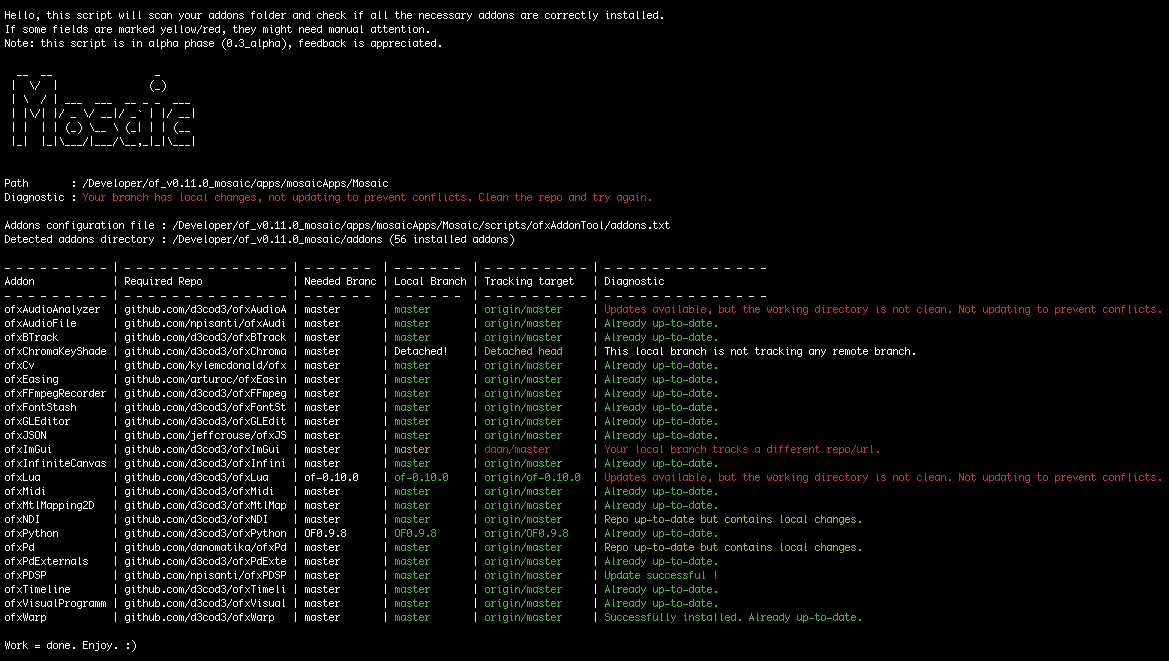
Introduction
Working with several OpenFrameworks projects, each requiring specific versions of ofxAddons can be a headache. This script aims to simplify dependency installation, verification and updating.How it works
It compares a configuration file (addons.txt) against the openframeworks/addons folder then runs some diagnostic checks and actions on them.Current State
This tool is still under development (alpha). Basic functionality is there and remains to be tested on a wider set of configurations. Any feedback, suggestions or contributions are welcome.License
MIT license. Read license. By Daan de Lange.Installation
To install this tool, the easiest way is to add it to your OpenFrameworks project as a submodule, so you can easily track updates. You're free to install it in the root of your project or in any subfolder. The script will assume your project root is the first parent directory containingaddons.txt. Please, note that this is not an OpenFrameworks addon, so don't install it in path/to/of/addons. In the example below, we will install it to the
scripts folder. cd /path/to/of/apps/myApps/exampleApp
mkdir scripts && cd ./scripts
git submodule add https://github.com/Daandelange/ofxAddonTool.git
mv ./scipts/ofxAddonTool/addons.txt ./addons.txt
Alternatively, you can also download
ofxAddonTool.sh + addons.txt and place them in the root of your project directory. cd /path/to/of/apps/myApps/exampleApp
curl -L -O https://raw.githubusercontent.com/daandelange/ofxAddonTool/master/addons.txt -L -O https://raw.githubusercontent.com/daandelange/ofxAddonTool/master/ofxAddonTool.sh
Install required dependencies
For the use ofrealpath, included in the GNU core utilities : - Mac :
brew install coreutilsorbrew install coreutils --build-from-source(10.12) - Linux : Included in most distros.
Install optional dependencies
If you want fancy ASCI art, installtoilet or figlet. (optional) - Mac :
brew install figlet - Linux :
apt install figlet
Configuration
EdityourProject/addons.txt with your favourite text editor to suit the needs of your project. For each addon, you need to provide the title (folder name), the URL and the branch to checkout. Further instructions are within that file. Usage
cd /path/to/of/apps/myApps/exampleApp/scripts/ofxAddonTool
./ofxAddonTool.sh --check
./ofxAddonTool.sh --help
Updating
To get the latest version of this script.# Get updates
cd /path/to/of/apps/myApps/exampleApp/scripts/ofxAddonTool
git checkout master && git pull
Tell your project to use ofxAddonTool's latest commit (repo owners only)
cd /path/to/of/apps/myApps/exampleApp
git add /scripts/ofxAddonTool
git commit -m "Update submodule ofxAddonTool to latest version."
git push
Synchronize all submodules of your project (user update method)
cd /path/to/of/apps/myApps/exampleApp
git checkout master && git pull
git submodule update